

About Hostinger WordPress Hosting
Hostinger WordPress Hosting is a managed WordPress hosting service designed specifically to run WordPress websites efficiently and with minimal technical effort. It focuses on performance, ease of use, and WordPress optimization.
Managed WordPress Hosting
Hostinger provides WordPress hosting as a fully managed service, meaning most technical tasks—such as updates, maintenance, and server optimization—are handled by the hosting provider. This allows users to focus on building and managing their websites instead of server management.
Optimized for WordPress
The hosting environment is specifically optimized for WordPress websites. This includes built-in performance enhancements and tools designed to improve site speed, stability, and overall WordPress functionality.
Recommended by WordPress.org
Hostinger is officially recommended by WordPress.org as a trusted WordPress hosting provider, highlighting its compatibility and reliability for WordPress users.
Included Features
Hostinger WordPress Hosting comes with several built-in features, including:
Free website migration
Free SSL certificate
Free domain (available with certain plans)
Automatic backups
AI-powered tools to assist with website creation and management
Easy-to-Use Control Panel (hPanel)
Instead of traditional control panels, Hostinger uses its own custom control panel called hPanel, designed to simplify website and hosting management for WordPress users.
Focus on Performance and Security
The service includes technologies and tools aimed at improving website speed, uptime, and security, ensuring WordPress sites remain fast, stable, and protected.
Hostinger wordpress Hosting Plans
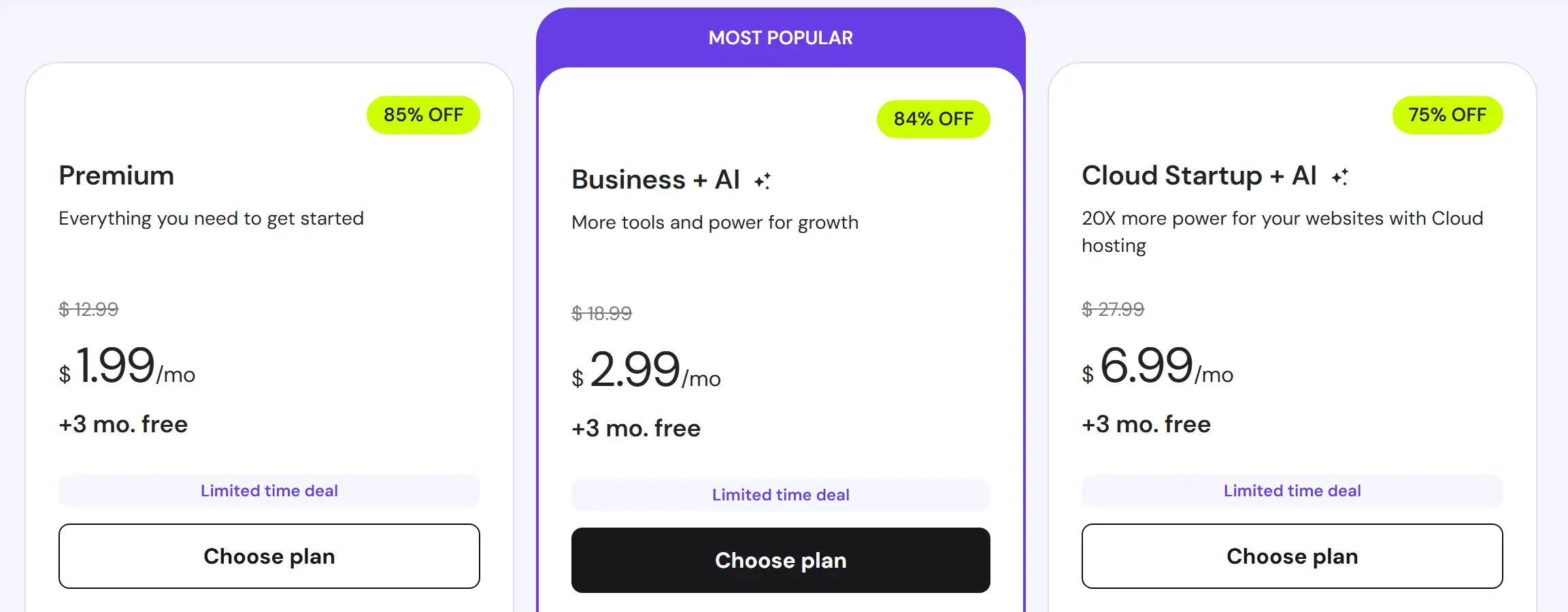
Here’s a comparison table of Hostinger’s WordPress hosting plans, highlighting the main features included with each plan.
Feature
Price
Websites
Storage
Bandwidth
Free Domain
Email Accounts
SSL
Premium Shared
~$1.99/mo
Up to 3 sites
20 GB SSD
Unlimited
Yes (1 year)
2
Yes
Feature
Price
Websites
Storage
Bandwidth
Free Domain
Email Accounts
SSL
Business Shared
~$2.99/mo
Up to 50 sites
50 GB NVMe
Unlimited
Yes (1 year)
5
Yes
Feature
Price
Websites
Storage
Bandwidth
Free Domain
Email Accounts
SSL
Cloud Startup
~$6.99-/mo
Up to 100 sites
100 GB NVMe
Unlimited
Yes (1 year)
10
Yes
 Quick Tips:
Cloud Startup is a cloud hosting plan with significantly more resources and better scalability compared to traditional shared plans.
Hostinger lists it alongside wordpress hosting to provide users with an upgrade path: beginners can start with shared hosting and easily move to Cloud Startup as their website grows.
Prices and features vary depending on promotional discounts, subscription duration (longer periods = cheaper monthly rates), and seasonal offers or special promotions.
plugins to significantly improve loading times.
Hostinger wordpres Hosting Plans Details
Premium wordpress Hosting
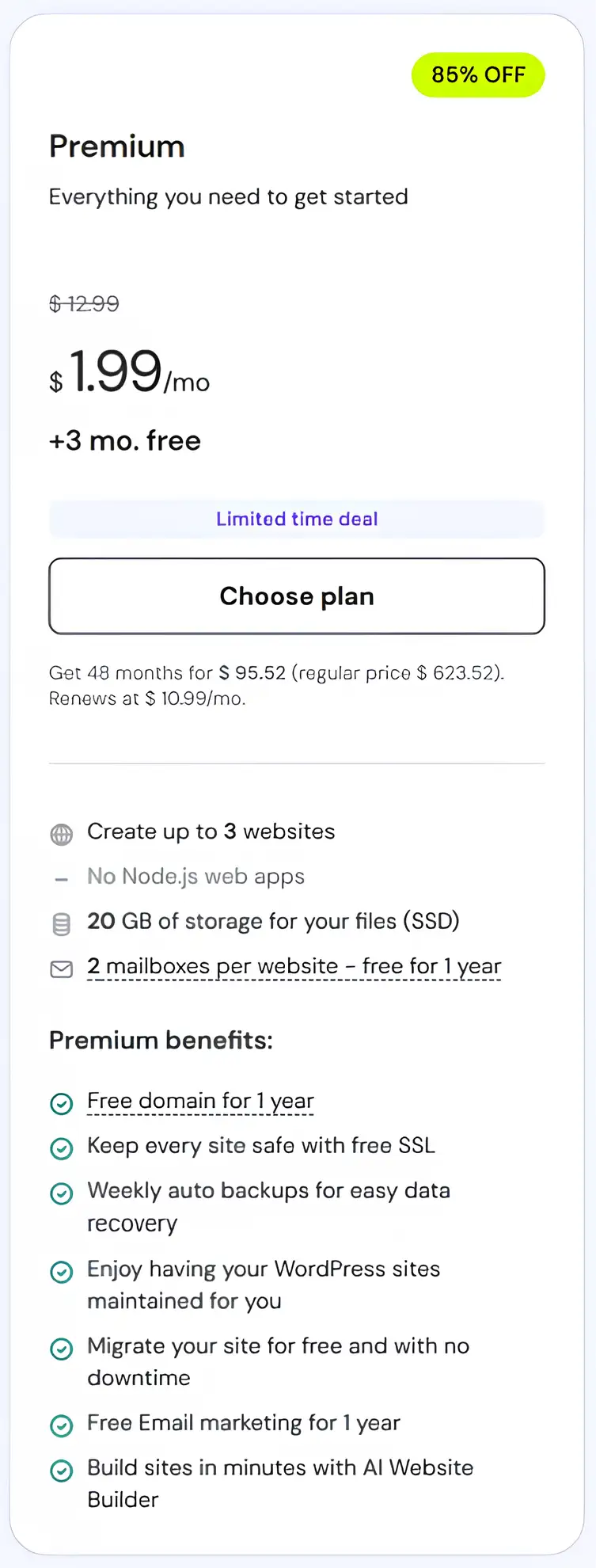
Everything you need to get started.
Price: $1.99/month for 48 months + 3 months free (regular price $623.52). Renews at $10.99/month.
Create up to 3 websites.
No Node.js web apps.
Storage: 20 GB SSD for your files.
Email: 2 mailboxes per website, free for 1 year.
Premium benefits:
Free domain for 1 year.
Keep every site safe with free SSL.
Weekly auto backups for easy data recovery.
Managed WordPress: your WordPress sites are maintained for you.
Free website migration with no downtime.
Free Email marketing for 1 year.
Build sites in minutes with AI Website Builder.
| ✅ Pros | ❌ Cons |
|---|---|
| Affordable and perfect for beginners | Limited storage (20 GB SSD) |
| Supports up to 3 websites | No Node.js apps support |
| Free domain for 1 year | Not ideal for high-traffic websites |
| Free SSL and weekly backups | Advanced features only in higher plans |
| Beginner-friendly hPanel | |
| AI Website Builder included | |
| Managed WordPress sites |
Business wordpress Hosting
Details in points:
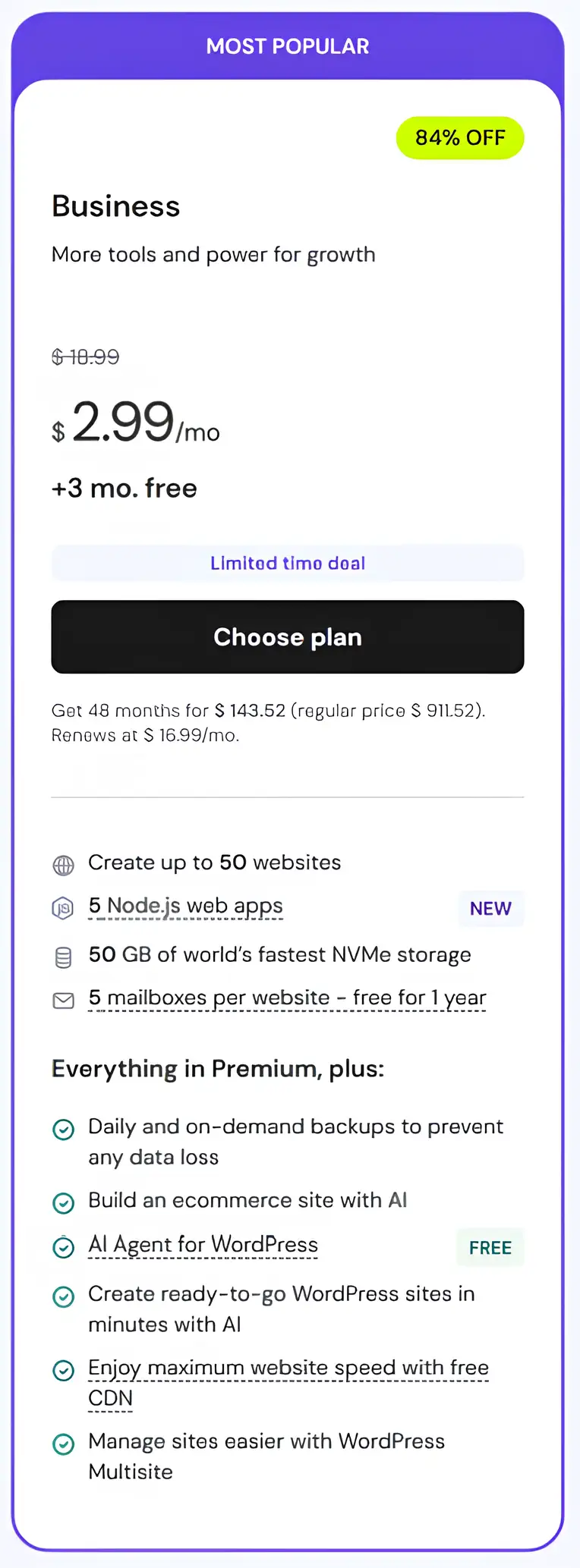
More tools and power for growth.
Price: $2.99/month for 48 months + 3 months free (regular price $911.52). Renews at $16.99/month.
Create up to 50 websites.
5 Node.js web apps.
Storage: 50 GB NVMe, the world’s fastest storage.
Email: 5 mailboxes per website, free for 1 year.
Everything in Premium, plus:
Daily and on-demand backups to prevent any data loss.
Build an eCommerce site with AI.
AI Agent for WordPress.
Create ready-to-go WordPress sites in minutes with AI.
Enjoy maximum website speed with free CDN.
Manage sites easier with WordPress Multisite.
| ✅ Pros | ❌ Cons |
|---|---|
| Affordable and perfect for beginners | Limited storage (50 GB SSD) |
| Supports up to 50 websites | No Node.js apps support |
| Free domain for 1 year | Not ideal for high-traffic websites |
| Free SSL and weekly backups | Advanced features only in higher plans |
| Beginner-friendly hPanel | |
| AI Website Builder included | |
| Managed WordPress sites |
Hostinger AI-Powered Tools
Hostinger WordPress plans include a powerful set of AI tools designed to simplify website creation, maintenance, and growth. These tools help users save time, improve performance, and solve issues faster—even without advanced technical skills.
With Instant AI Websites, users can quickly generate a complete WordPress site using Elementor or the Block Editor. The AI Agent for WordPress assists with managing and optimizing the site, while the AI WordPress Troubleshooter helps identify and resolve common website issues efficiently.
AI features are available on higher-tier plans like Business + AI and Cloud Startup + AI, making them ideal for users who want faster setup, smarter management, and scalable growth powered by automation and intelligent tools.
Hostinger Customer Support
Hosting offers multiple support channels to help users at every step:
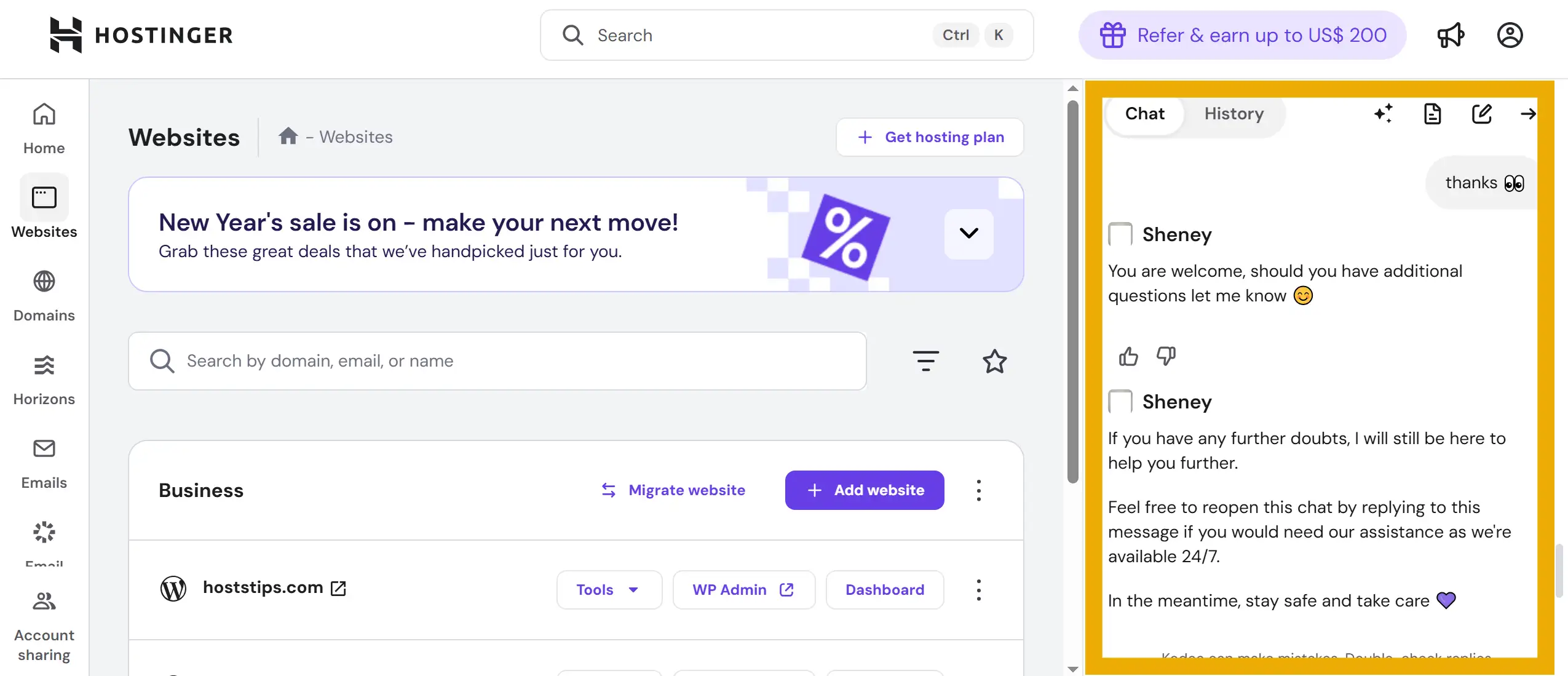
Live Chat Support: 24/7 access to real support agents for immediate assistance.
Email Support:
You can reach Hostinger via email for detailed inquiries or issues that require step-by-step guidance. Relevant addresses include:
[email protected] – General hosting support
[email protected] – Questions about plans and pricing
[email protected] – Account recovery issues
[email protected] – Reporting abuse or security concerns
AI Assistance: Hostinger provides AI-powered tools and chatbots to answer common questions or guide you through technical setups.
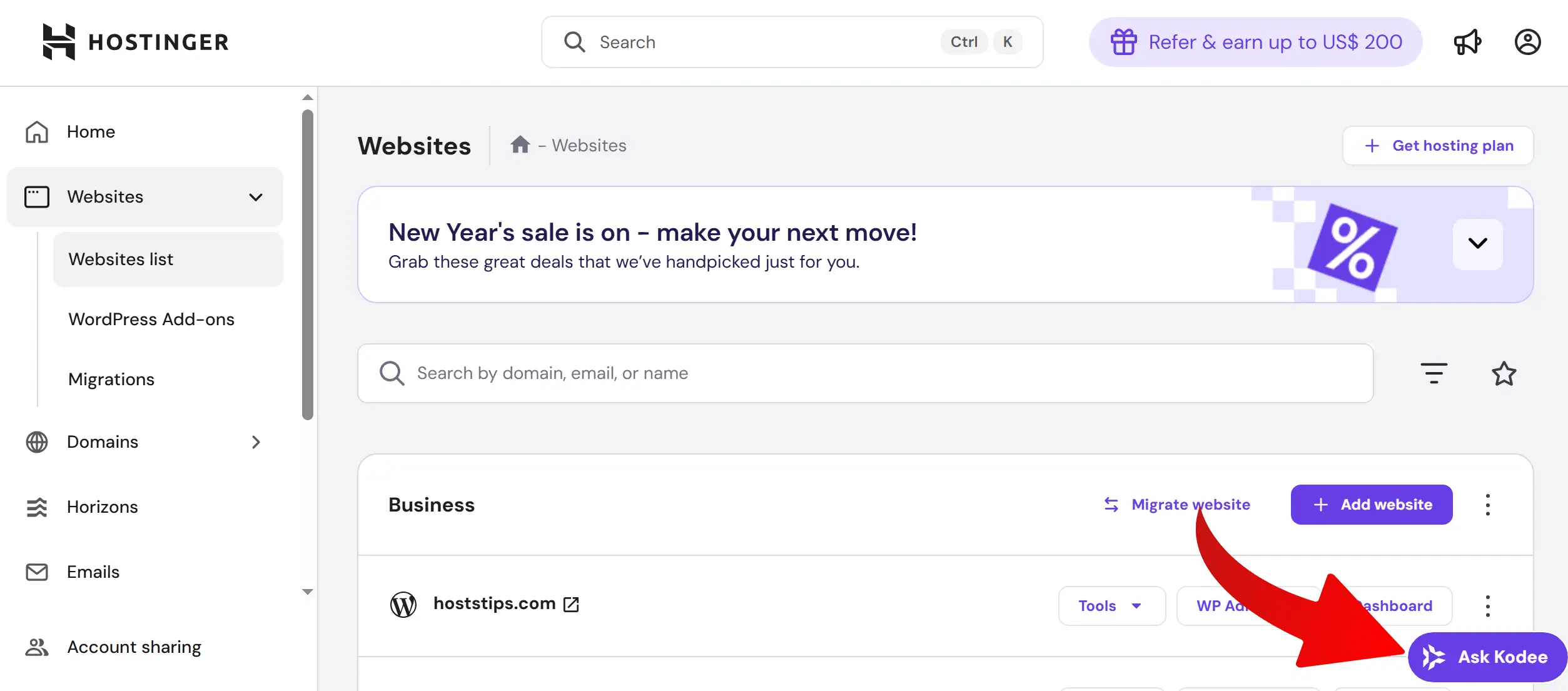
Knowledge Base & Tutorials:
Hostinger provides an extensive knowledge base with articles, guides, and video tutorials covering WordPress setup, optimization, and troubleshooting. Users can find step-by-step instructions for installing WordPress, managing plugins, improving performance, ensuring security, setting up backups, and more. These resources are continuously updated and are available even before purchasing a plan.
Official link: https://www.hostinger.com/tutorials
Choosing the Best Hostinger WordPress Plan

85% OFF wordpress Hosting + HostsTips Exclusive 20% Discount
visit hostinger
Selecting the right Hostinger WordPress plan should be based on your website’s purpose, size, and expected traffic. Here’s a practical guide to help you choose between Premium, Business + AI, and Cloud Startup + AI plans:
Low Traffic (1,000–15,000 visits/month)
Perfect for personal blogs, portfolios, or small informational sites.Recommended plan: Premium
Provides essential features, reliable performance, and enough storage for lightweight sites.
Affordable and easy to manage without advanced tools.
Medium Traffic (15,000–100,000 visits/month)
Suitable for growing blogs, small business websites, or small e-commerce stores.Recommended plan: Premium or Business + AI
Choose Business + AI if you need AI tools, additional storage, or more performance resources.
Includes daily or weekly backups and handles moderate traffic smoothly.
High Traffic (100,000–250,000+ visits/month)
For larger business sites, content-heavy blogs, or multi-site setups.Recommended plan: Business + AI
Offers advanced features like AI tools, staging environments, caching, and enhanced performance resources.
Maintains speed and stability under higher traffic loads.
Very High / Enterprise Traffic (250,000–500,000+ visits/month)
Ideal for major news sites, popular blogs, or high-traffic e-commerce platforms.Recommended plan: Cloud Startup + AI
Includes cloud infrastructure, dedicated resources, priority support, daily backups, and maximum performance features.
Can handle traffic spikes, heavy load, and ensure continuous uptime.
Summary: By evaluating your site’s size, complexity, expected traffic, and required features (like AI tools, backups, and storage), you can select the Hostinger WordPress plan that fits your current needs and supports future growth.
Hostinger wordpress Hosting Test Speed
I ran a performance test on a website hosted with Hostinger’s WordPress website using Google PageSpeed Insights. The results (shown below) give a clear indication of how fast and efficiently WordPress sites load on this managed hosting plan.
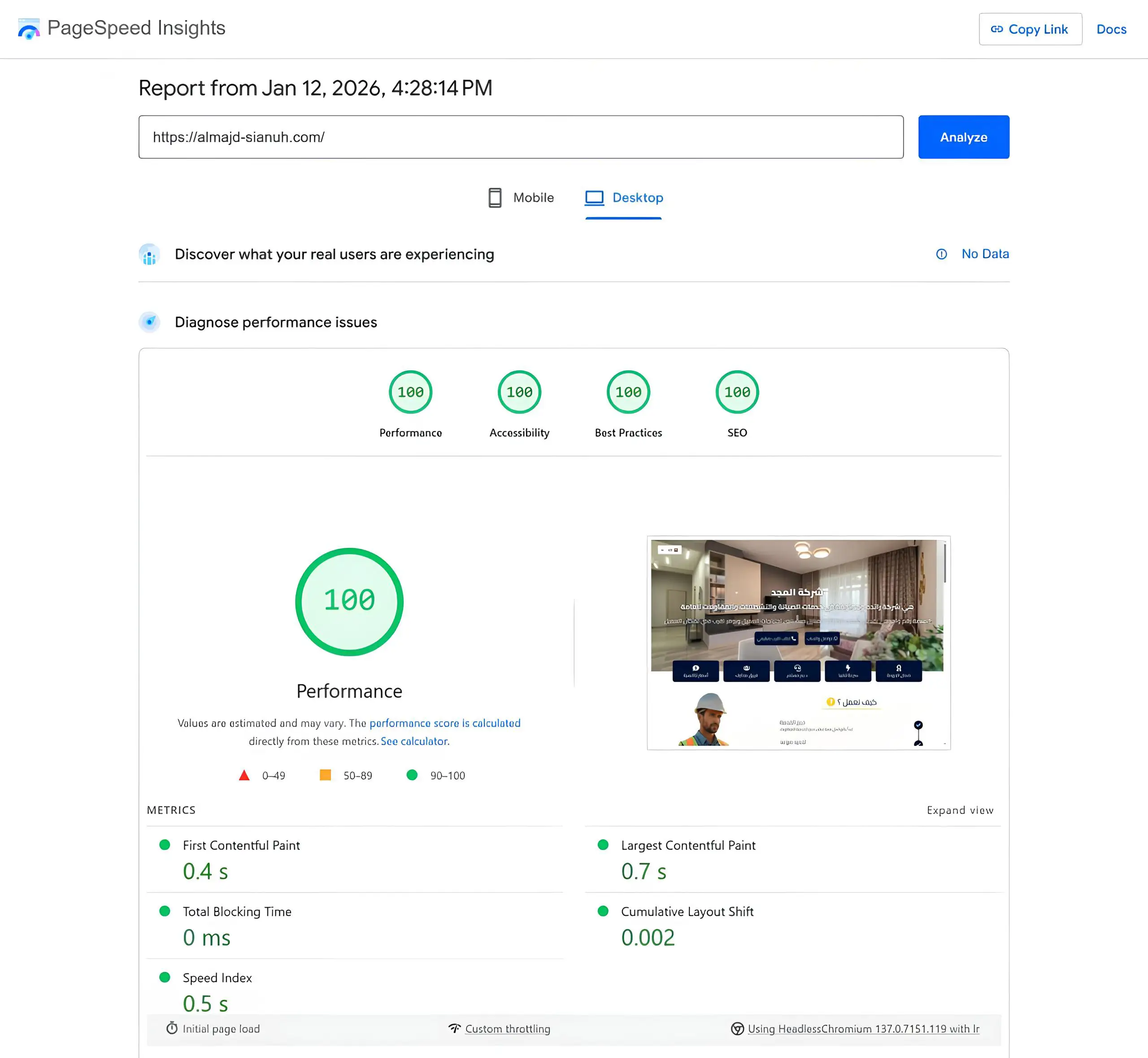
💡 Tip: Website speed doesn’t depend on hosting alone—optimize images and use caching/performance plugins to significantly improve loading times.
Frequently Asked Questions
Is Hostinger good for beginners?
Yes — Hostinger is beginner‑friendly thanks to its simple control panel, AI website tools, and managed WordPress features that require minimal technical skills.
How much does Hostinger WordPress Hosting cost?
Prices start at around $1.99/month (Premium plan) with options to upgrade to higher plans like Business or Cloud Startup for more storage and resources based on site size and traffic.
visit hostinger
Contents