




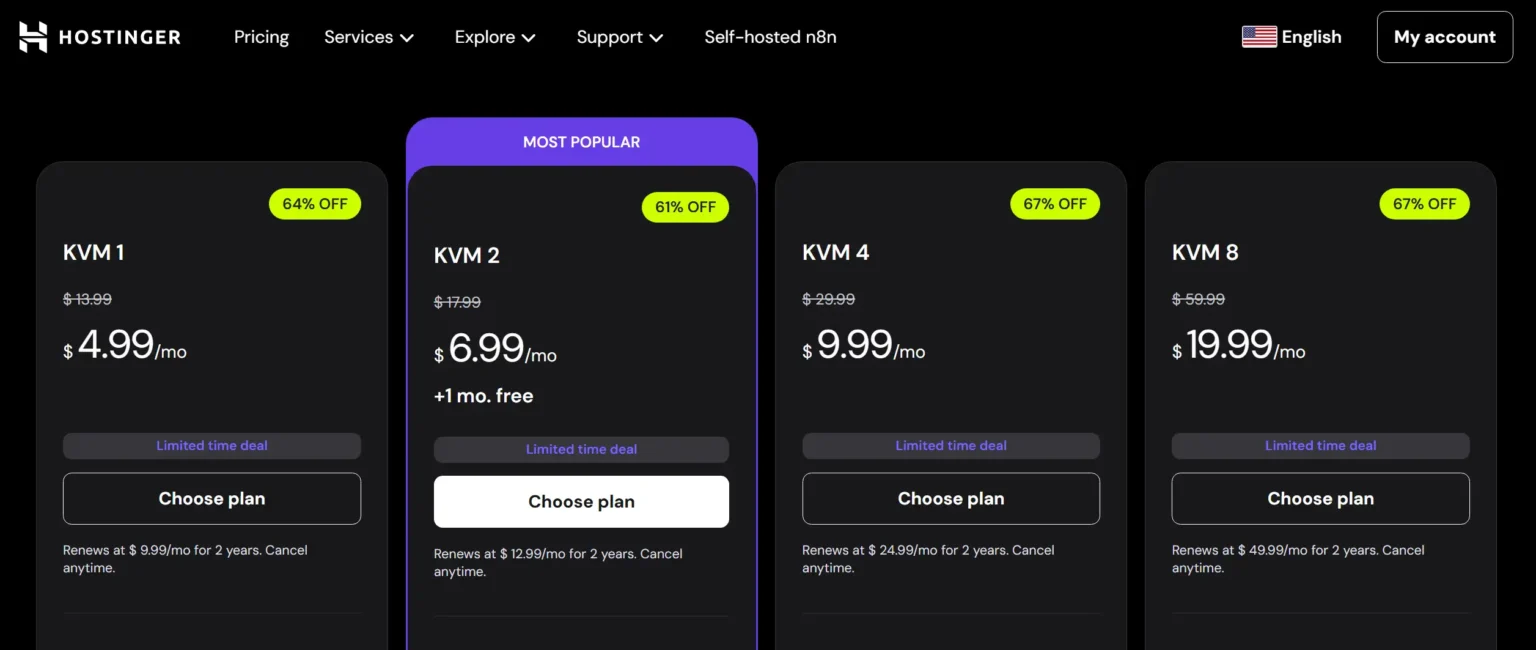
The new KVM lineup: More RAM, More Speed, Better Isolation.

NVMe Gen4
Blazing Fast Storage

KVM Tech
Dedicated Resources

$4.99/mo
Entry-level Pricing

Global DCs
Low Latency
In the rapidly evolving landscape of 2026, Shared Hosting often falls short for modern applications. Whether you’re deploying a Docker container, a high-traffic WordPress store, or an AI-driven tool, the need for a Virtual Private Server (VPS) is no longer a luxury—it’s a necessity.
Hostinger has positioned itself as the disruptor in the VPS market. But does their low price compromise stability? In this deep-dive review, we strip away the marketing fluff to analyze the hardware, benchmarks, and real-world scalability of Hostinger VPS.
What is VPS Hosting & Why Hostinger’s KVM Matters?
Think of Shared Hosting like living in an apartment complex where you share the water and electricity with everyone. If your neighbor leaves the tap running, your pressure drops.
VPS (Virtual Private Server) is like owning a townhouse; you have your own dedicated plumbing and power lines.
The KVM Revolution in 2026
Unlike old-school VPS technologies (like OpenVZ), Hostinger uses KVM (Kernel-based Virtual Machine). This ensures:
- Total Isolation: Other users on the same physical server cannot impact your performance.
- Custom Kernels: You can run specialized software and OS versions that were previously impossible.
- Better Security: Hardware-level virtualization provides a stronger shield against vulnerabilities.
Who is this for?
Growing Online Stores Web App Developers Security-Conscious Projects
 AI & ML Model Hosting
Tier 1 Analysis: KVM 1 & KVM 2 Plans
Choosing between the starter plans is where most users struggle. Is the cheapest option enough, or is the “Limited Time Deal” on KVM 2 the smarter investment? Let’s look at the data.
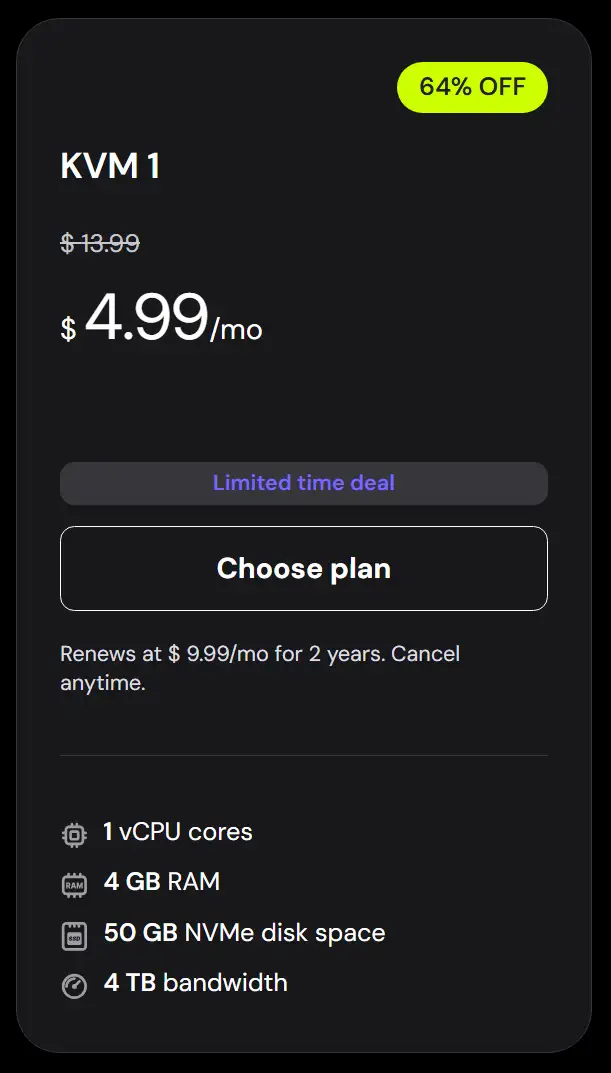
KVM 1: The “Sandbox” Choice
Perfect for developers who need a playground or low-traffic sites that require a dedicated environment.
 Pros: Lowest entry price ($4.99/mo), NVMe speed, Ideal for 1-2 small projects.
- ✘ Cons: 50GB storage can fill up quickly with backups; limited to 4GB RAM.
 Pros: Lowest entry price ($4.99/mo), NVMe speed, Ideal for 1-2 small projects.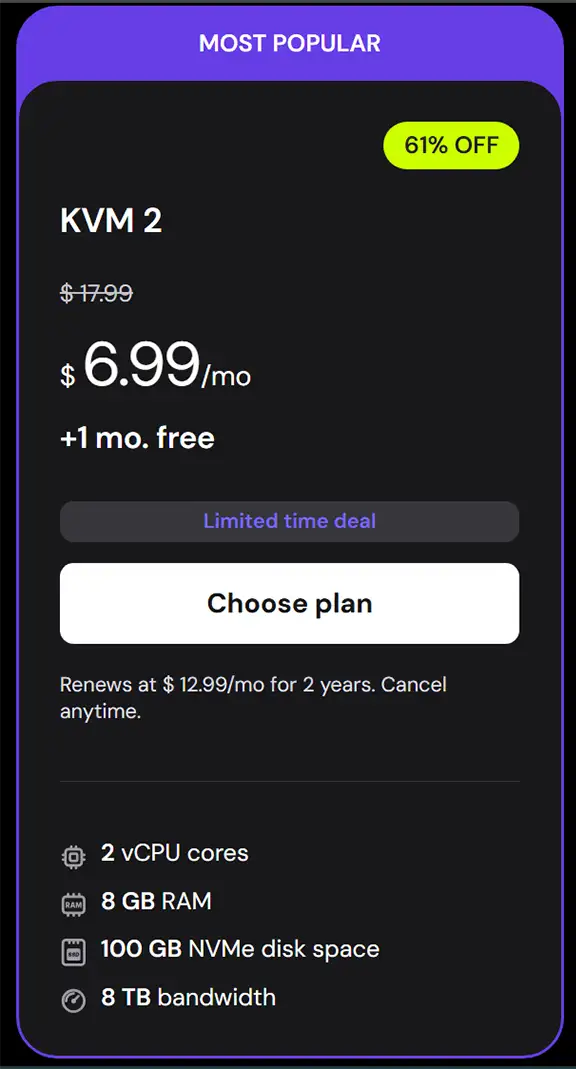
KVM 2: The “Sweet Spot”
Doubling the RAM and CPU cores for only a few dollars more. This is Hostinger’s most popular VPS plan for a reason.
- Pros: 8GB RAM handles most CMS (WordPress/Magento) smoothly; includes 1 month free.
- ✘ Cons: Still “Unmanaged” — you must be comfortable with the command line or a control panel.
 Pro Tip: If you are planning to run a Control Panel (like cPanel or CyberPanel), we strongly recommend starting with KVM 2. Control panels consume background RAM, and 4GB (KVM 1) can become a bottleneck under load.
Tier 2 Analysis: KVM 4 & KVM 8 (Power & AI Scaling)
When your project outgrows standard hosting, you need vertical scaling. The KVM 4 and KVM 8 plans are built for heavy computational loads, large-scale databases, and modern AI deployments.
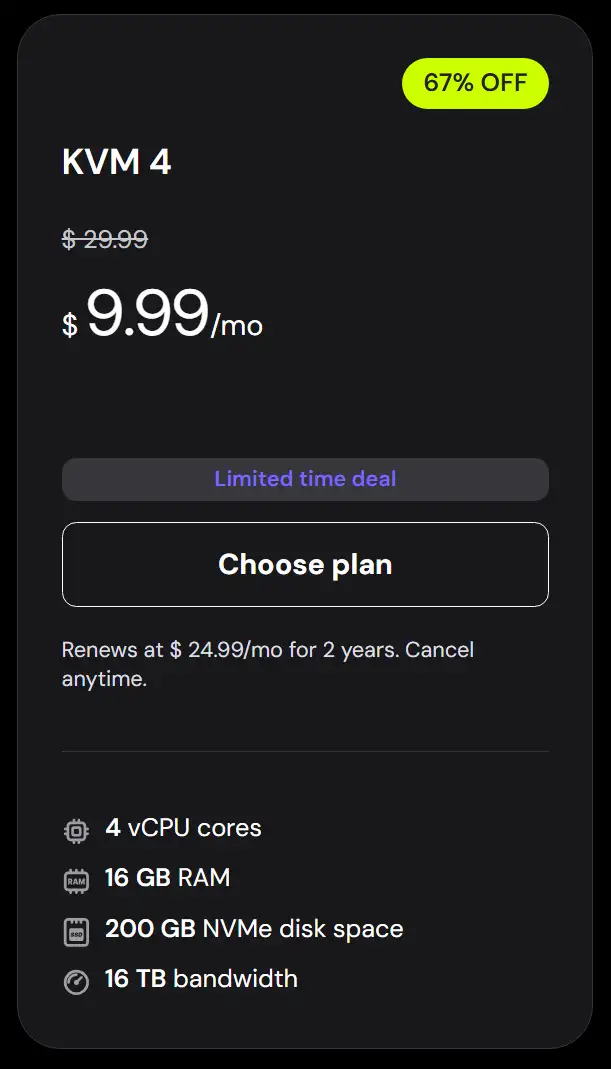
KVM 4: The Professional Standard
With 16GB of RAM and 4 vCPU cores, this plan is the threshold for serious business operations.
- Pros: 200GB NVMe storage (Gen4 speed); handles 200k+ monthly visits easily.
- ✘ Cons: Higher renewal price ($24.99/mo); requires solid server admin skills.
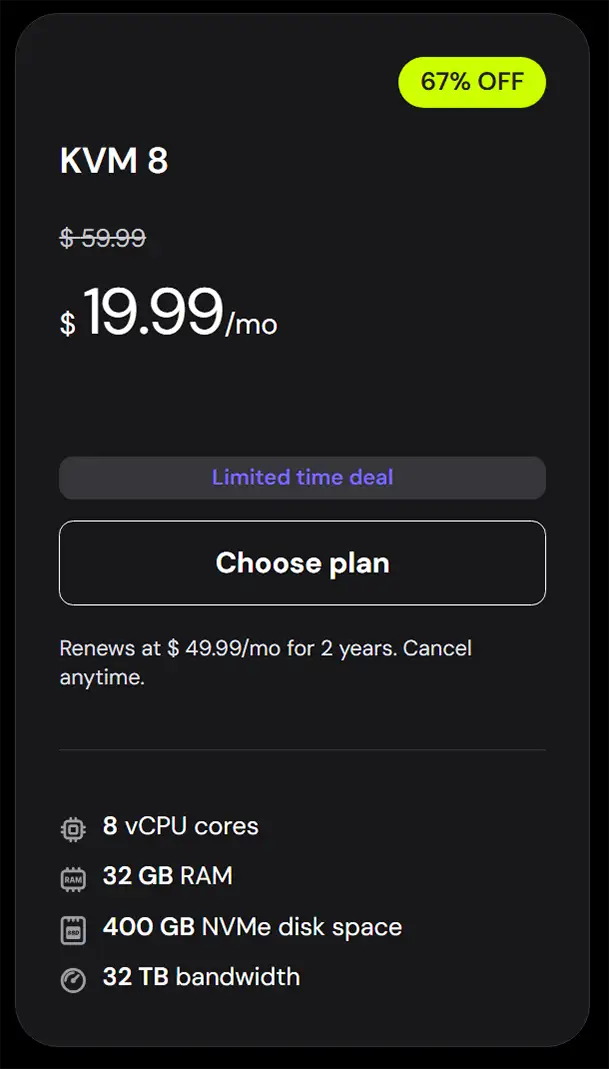
KVM 8: The Ultimate Workhorse
Hostinger’s most powerful VPS offering. It competes directly with high-end cloud providers at a fraction of the cost.
- Pros: 32GB RAM & 8 vCPU cores; massive 32TB bandwidth for data-heavy projects.
- ✘ Cons: Significant price jump upon renewal; overkill for most standard websites.
Why “vCPU Cores” and “NVMe” Matter in 2026?
Hostinger uses NVMe SSDs which are up to 10x faster than standard SSDs. Combined with KVM 8’s 8 cores, your database queries will execute in milliseconds, ensuring your users never see a loading spinner.
Operating Systems & Control Panels: Total Freedom
A VPS is only as good as the software it runs. Hostinger provides a curated list of Linux distributions and control panels that can be installed with a single click.
Supported Operating Systems
From the stability of Debian to the security-focus of Kali, the choice is yours.
The “Panel” Powerhouse
Managing an unmanaged VPS can be daunting. Hostinger solves this by supporting both industry-standard paid panels and high-performance free alternatives:
Paid / Enterprise
- cPanel/WHM: The gold standard for hosting resellers.
- Plesk: Excellent for Windows/Linux hybrid needs.
- DirectAdmin: Lightweight and highly efficient.
Free / Open Source
- CyberPanel: Built on LiteSpeed for extreme speed.
- CloudPanel: Optimized for PHP and Node.js apps.
- HestiaCP: Clean, simple, and very fast.
Quick Recommendation
If you want the absolute best speed for a WordPress site, go with Ubuntu 22.04 + CyberPanel. The OpenLiteSpeed integration on Hostinger’s NVMe drives produces incredible Time-To-First-Byte (TTFB) results.
One-Click Apps & Custom Deployments
Hostinger isn’t just for websites. Its VPS infrastructure is optimized for a wide array of specialized applications. Whether you are an automation enthusiast or a developer building the next AI tool, the environment is ready.

Development & DevOps
Deploy containers and manage code repositories with ease.
Node.js
GitLab
VS Code
AI & Automation
Run local LLMs and automated workflows privately.
n8n
Chatwoot
Node-RED

Business Tools
Manage your entire company from a single VPS.
Mattermost
Nextcloud
Advanced Security Apps
Hostinger supports OpenVPN and WireGuard, allowing you to turn your VPS into a secure, private tunnel for your team. You can also host Uptime Kuma to monitor your other services in real-time.
*Note: These applications are just the tip of the iceberg. With full Root Access, you can install virtually any Linux-compatible software.
Customer Support: Can You Get Help When Things Break?
Since Hostinger VPS is unmanaged, you are technically the captain of your own ship. However, Hostinger doesn’t leave you stranded. Their support system in 2026 is a sophisticated mix of instant AI and expert human intervention.

24/7 Live Chat
Available directly via hPanel. In our tests, human agents responded within 2-10 minutes, even during peak hours.
Meet “Kodee” AI
Kodee handles 80%+ of queries instantly. It can perform admin tasks like backups, DNS checks, and site migrations automatically.
The Academy: Learning for Free
Hostinger’s Knowledge Base is arguably one of the best in the industry. It features:
- 260+ Detailed VPS Articles: Covering everything from SSH keys to Docker Compose.
- Video Tutorials: Visual step-by-step guides for those who prefer watching over reading.
- Regular Updates: Content is updated weekly to match the latest OS and software releases.
 Crucial Note: Remember that for VPS plans, support is “Unmanaged.” This means agents will help you with server-side issues (network, hardware, billing), but they won’t debug your custom PHP code or fix your app’s internal bugs. For that, you’ll need to consult their documentation or use the AI Assistant to guide you.
Performance Benchmarks: Real-World Speed Tests
Specs on paper are one thing, but how does the server actually perform under load? We ran a series of backend benchmarks on a standard KVM 2 instance running Ubuntu 24.04 and OpenLiteSpeed.
Excellent (Global Avg)
Symmetrical 1Gbps Port
NVMe Gen4 Performance
Google PageSpeed Insights Analysis
Using a WordPress site with Elementor and 15+ plugins, here is how a KVM 2 plan scores out of the box (with basic Litespeed Caching):
Hardware Powerhouse: AMD EPYC™ 9354P
Hostinger has updated its fleet to AMD EPYC™ 4th Gen processors. These CPUs are specifically designed for virtualization, delivering 1,600+ events per second in computational benchmarks. When paired with DDR5 RAM, you get lower latency and better stability during high-traffic spikes compared to older Intel Xeon setups used by many competitors.
The Strategic Selection: Matching Plans to Goals
Don’t pay for resources you won’t use. We have categorized the Hostinger VPS lineup based on 2026’s most common digital projects to help you pick the perfect fit.
| Project Type | Recommended Plan | Key Reason |
|---|---|---|
| Automation (n8n / Odoo) | KVM 2 | 8GB RAM handles multiple concurrent workflows smoothly. |
| AI Models (Ollama / LLMs) | KVM 8 | High vCPU count is critical for local data processing and inference. |
| High-Traffic WordPress | KVM 4 | 16GB RAM prevents database crashes during 200k+ monthly visits. |
| Learning / Staging | KVM 1 | Affordable entry to learn Linux CLI and server hardening. |

Traffic Matching Rule of Thumb:
Under 50k visits: KVM 1 | 50k–200k visits: KVM 2 | 200k+ visits: KVM 4 or higher.
Final Verdict: Is Hostinger VPS Right for You?
👍 What We Love
- Extreme Performance: NVMe Gen4 + KVM is a powerhouse combo.
- Price-to-Power Ratio: Unbeatable entry pricing for the specs.
- Control Panel Variety: Support for both paid and free modern panels.
- Global Reach: Low-latency data centers across 4 continents.
👎 Points to Consider
- Unmanaged: Requires basic Linux knowledge or a panel setup.
- Renewal Prices: Expect a jump in cost after the initial term.
- Limited Storage: KVM 1 (50GB) may feel tight for backup-heavy sites.
Frequently Asked Questions
Hostinger VPS is unmanaged. This means you have full root access and control, but you are responsible for software updates and server-side configurations. However, their 24/7 support and AI Assistant are available for infrastructure-related issues.
Yes, scaling is seamless. You can upgrade from KVM 1 to KVM 2 or higher directly from your hPanel without any data loss or downtime.
Absolutely. When paired with a panel like CyberPanel or CloudPanel, Hostinger VPS significantly outperforms standard shared hosting, especially for sites built with heavy builders like Elementor.
Hostinger offers a 30-day money-back guarantee on all VPS plans, allowing you to test the performance risk-free.
Despite Hostinger’s user-friendly interface, its VPS servers deliver powerful and stable performance, making them a recommended choice for projects that require high-performance hosting.
The review clearly shows that Hostinger is an excellent choice for beginners, thanks to its simple and user-friendly control panel.
I tried using Namecheap, but honestly, its interface felt much more complicated and less intuitive, especially for new users.