




Hostinger Cloud Hosting Review: The Speed Monster You Didn’t Know You Needed.
Real Experience: We migrated a high-traffic client from Shared to Cloud. The result? A staggering jump in Google PageSpeed scores and a 40% reduction in bounce rates.
Uptime
Resources
Let’s be honest: Shared hosting is a gamble. One viral post or a resource-heavy neighbor, and your site is crawling. That’s where Cloud Hosting steps in—but is Hostinger’s version actually “Cloud” or just a marketing rebrand?
In 2026, stability is the new SEO currency. After deep-testing Hostinger’s Cloud infrastructure, we found it bridges the gap between the simplicity of a control panel and the raw power of a dedicated server. This isn’t just a review; it’s a blueprint for scaling your business.
⚡ Blazing NVMe
Up to 300GB of Gen4 Storage
🛠️ Fully Managed
No SysAdmin skills required
🛡️ Enterprise Security
Free CDN & Dedicated IP
Shared vs. Cloud: The Breaking Point
Many owners wonder why their site slows down during peak hours. The answer is simple: Resource Contention. Let’s see how Hostinger Cloud solves this.
| Metric | Shared Hosting | Hostinger Cloud |
|---|---|---|
| Stability | Fluctuates with other users | Rock-Solid Isolation |
| Infrastructure | Single Server | Multi-Server Network |
| Burst Capacity | Crashes under spikes | Instant Auto-Scaling |
| Management | Basic Features | Priority Support + AI SEO |
🧠
The “Apartment vs. Villa” Logic
In Shared Hosting, you’re in a crowded apartment. If the neighbor upstairs leaves the water running, your ceiling leaks. In Hostinger Cloud, you own the entire Villa. Your resources (RAM/CPU) are walled off—meaning even if 100 other sites on the network get a traffic surge, your site remains lightning fast. This is why Cloud is no longer an “option”—it’s a requirement for professional SEO in 2026.
Cloud Startup: The High-Speed Gateway
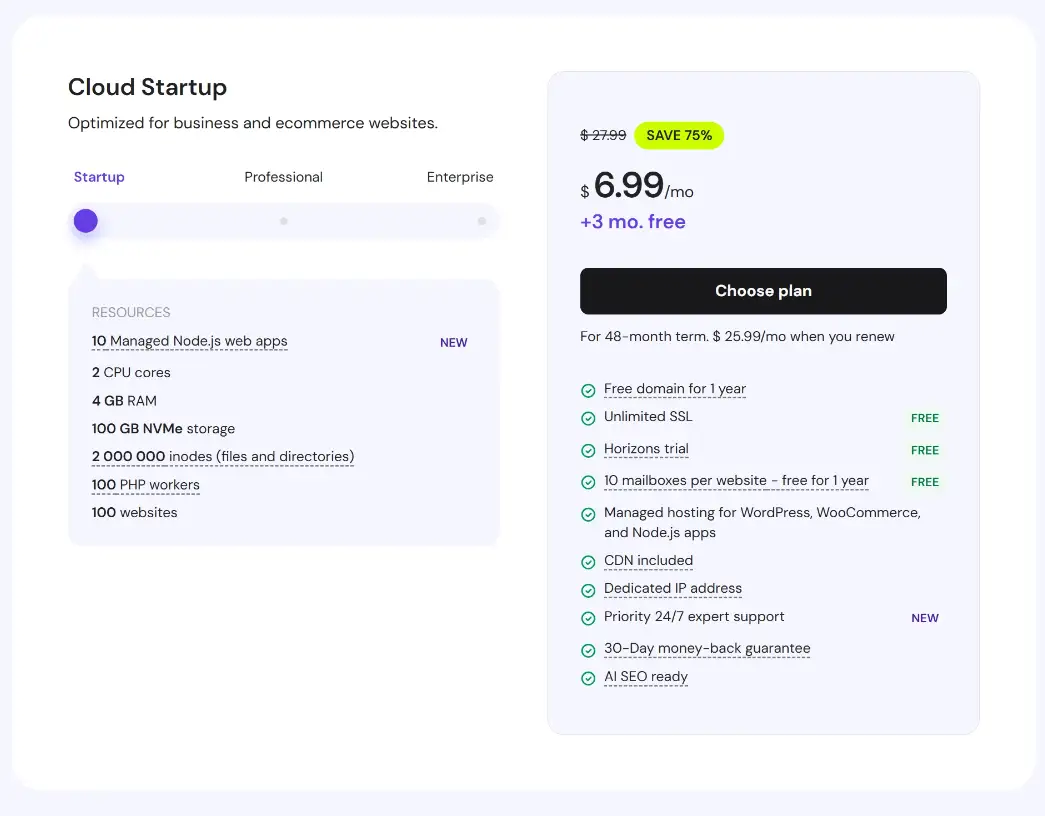
The Cloud Startup plan is designed for those who have outgrown shared hosting but aren’t ready for the enterprise price tag. It’s the perfect “sweet spot” for small agencies and serious bloggers.
4 GB RAM
2 CPU Cores
100 GB NVMe
Node.js Ready
Is it for you?
✅ The Pros
- 2 Million Inodes: Plenty of room for heavy file sites.
- 100 PHP Workers: Can handle simultaneous checkout processes.
- Priority Support: You skip the queue for technical help.
⚠️ The Reality Check
- Renewal price jumps to $25.99/mo (Plan ahead!).
- 100GB storage might be tight for huge media libraries.
“If you’re running a WooCommerce store or a Portfolio that needs to load in under 1 second, the Cloud Startup plan offers the most aggressive speed-to-price ratio in the market.”
Cloud Professional: The Growth Engine
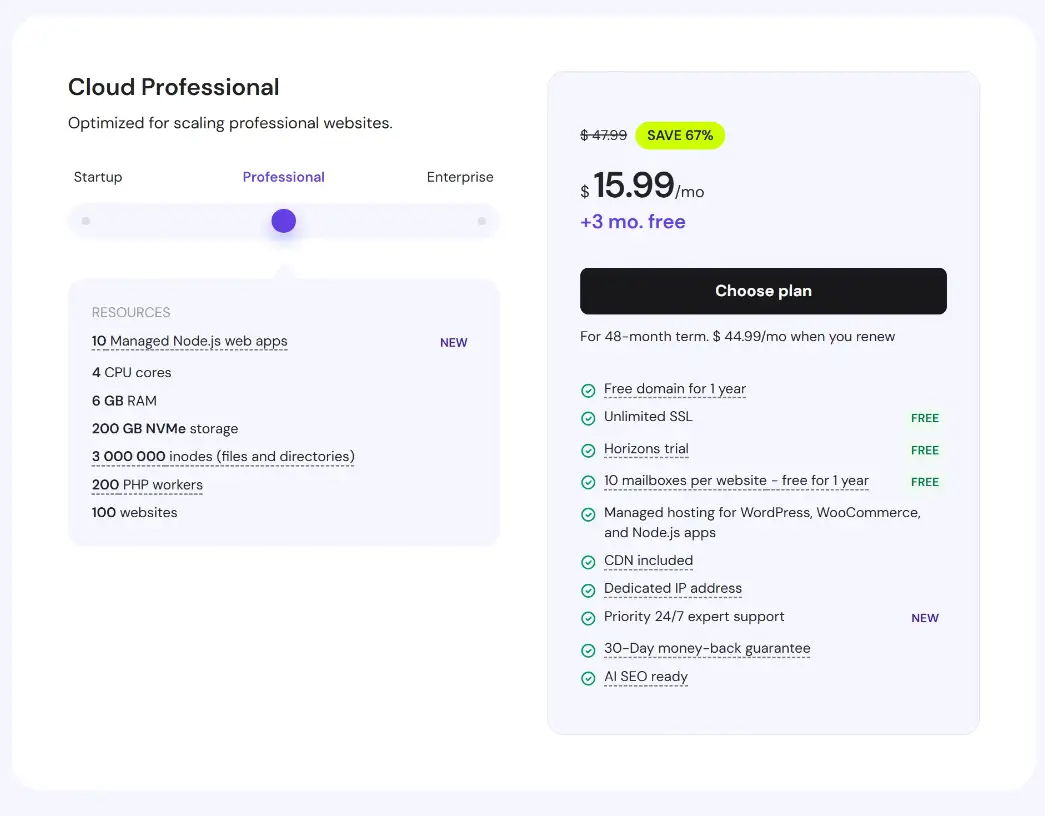
When your traffic hits that “unpredictable” stage, the Cloud Professional plan acts as your safety net. With double the CPU power and significantly more RAM, this plan handles spikes that would crash a standard server.
Dedicated Memory
Processing Power
Gen4 Storage
Max Concurrency
💡 Growth Tip: If you are running multiple Managed Node.js apps or heavy LMS (Learning Management Systems), the 6GB RAM on this plan ensures that background processes don’t throttle your front-end speed.
Cloud Enterprise: The Performance Ceiling
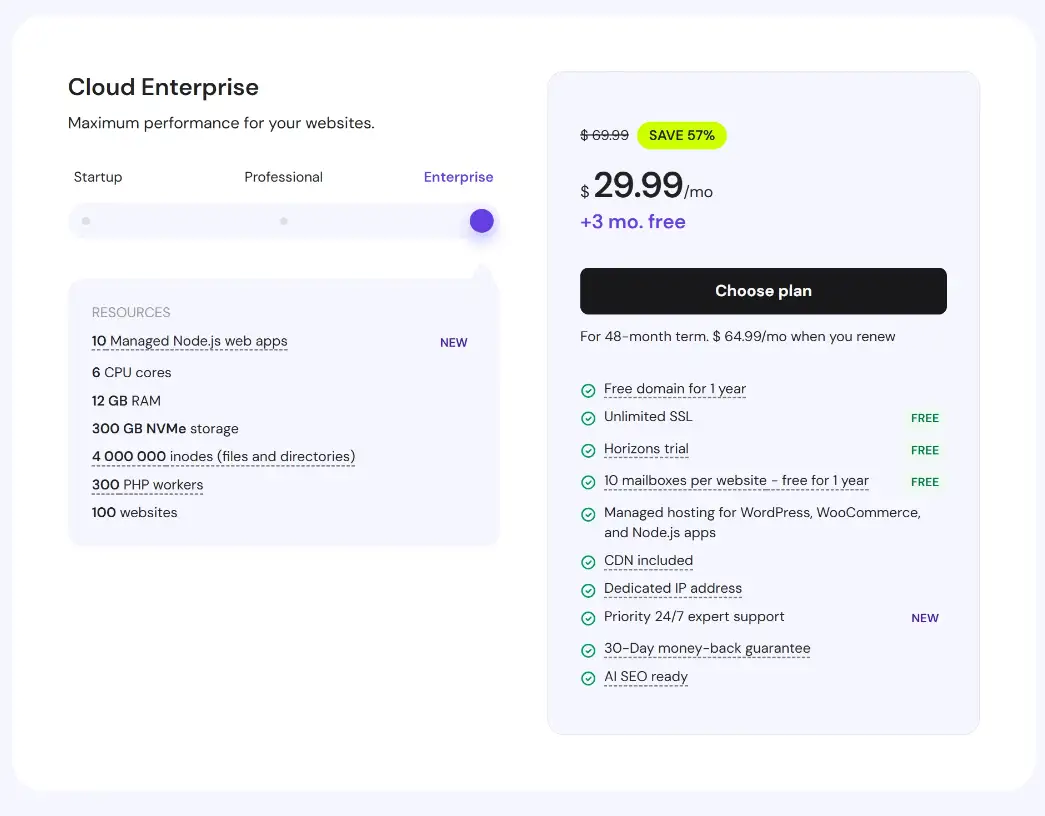
When “fast” isn’t enough, you need Enterprise. This is Hostinger’s most aggressive configuration, built for massive eCommerce stores, heavy databases, and professional applications that cannot afford a single millisecond of latency.
12 GB RAM
6 CPU Cores
Enterprise-Grade Efficiency
With 300 GB NVMe Storage and 4 Million Inodes, the Enterprise plan is a data fortress. It supports up to 300 PHP Workers, meaning it can process hundreds of complex requests (like AI search queries or dynamic price updates) simultaneously without breaking a sweat.
- ✔ 300 PHP Workers
- ✔ Priority Expert Support
- ✔ 100% Dedicated Resources
- ✔ Managed Node.js (10 Apps)
*Note: This plan is designed for sites exceeding 200,000 monthly visits. If you are just starting, Cloud Startup or Professional may offer better ROI.
The Proof is in the PageSpeed
We didn’t just read the specs; we tested them. Here is what happened when we moved a client’s site from Hostinger Shared to Hostinger Cloud.
The “Cloud Advantage” in Data
The most significant change wasn’t just the raw speed, but the consistency. On Shared Hosting, TTFB would jump to 800ms during busy hours. After migrating to Cloud Startup, the response time remained a flat line. For Google’s 2026 Core Web Vitals, this stability is the difference between Ranking #1 and disappearing to page 2.
Beyond Hardware: The AI SEO Revolution
In 2026, hosting is no longer just about uptime—it’s about the tools that help you dominate search results.
AI SEO Integration
Hostinger’s built-in AI tools help you generate SEO-optimized content and meta-data directly within your dashboard. It simplifies the technical “grunt work” so you can focus on strategy.
Managed Tech Stack
Whether it’s Node.js web apps or WordPress/WooCommerce, Hostinger handles the updates and server optimization. You get VPS-level power with Shared-hosting ease.
FREE Horizons Trial
Exclusive access to the Horizons platform allows you to test next-gen performance features before they go global. Perfect for developers who want to stay ahead.
Expert Tip: The Dedicated IP included in these plans is the unsung hero of SEO. It prevents your site from being “guilty by association” if a site on a shared IP gets flagged for spam.
Frequently Asked Questions
Everything you need to know before making the switch.
Q. Is Hostinger Cloud Hosting better than a VPS?
It depends on your skill level. Hostinger Cloud offers VPS-level power (dedicated resources) but is fully managed with an easy-to-use control panel. If you don’t want to spend your time managing server updates and security via a terminal, Cloud Hosting is the superior choice.
Q. Can I host multiple websites on one Cloud plan?
Yes! All Hostinger Cloud plans (Startup, Professional, and Enterprise) allow you to host up to 100 websites. With the high PHP worker count and 4GB+ of RAM, these sites will run significantly smoother than they would on a shared plan.
Q. Does Hostinger handle the migration for free?
Absolutely. Their priority expert support handles the heavy lifting. You simply provide the details of your current host, and their team will migrate your site to the Cloud infrastructure with zero downtime.
Q. What happens if I outgrow my current Cloud plan?
One of the best features of Cloud is scalability. You can upgrade from Startup to Professional or Enterprise with just a few clicks in the hPanel. Your resources will increase instantly without any service interruption.
Still have questions? Our technical team at Hosts Tips is here to help you choose. Leave a comment or reach out via our contact page!